Building a Volunteer Task Board (Part 1)
How a volunteer task board moved from Telegram and Google Apps Script toward a reviewable web app.
I am starting a series where I break down the process of building a product. I will share the problem/requirements, the building of the product, what broke in production, how to decide what features to ship and what not.
The first one is building a volunteer task board.
Problem
So we have noticed the limited manpower in our events. It’s usually the same people who were helping out. When asked, our volunteers pointed out saying that they felt overwhelmed by the number of messages that are being sent out in the group chat. So we built a telebot so that it will be able to compress all the information into one message.
After the release of the telebot, we still received the same feedback: overwhelming. Our volunteers did not know how to use it and were not sure what each command meant. They wanted a visual overview of the events and the tasks that are happening.
We also had issues with the backend of the telebot where it pauses if there is 7 days of inactivity.
Solution: Build a WDS Volunteer Task Board. It should:
-
Consolidate volunteer progress across departments in one place
-
Surface exactly when a volunteer is struggling with a task
Proposed Outcomes:
-
Volunteers can see the upcoming events in a calendar. For each event, the volunteers can see the tasks.
-
Tasks should be categorised in the kanban format: Done, In Progress, Not yet started
-
If the volunteer has taken up the task, there would be a Telegram notification that they have taken up (their names will be there), a guide on how to do the tasks, and the deadline for the tasks.
-
Volunteer to send a notification via Telegram if they are stuck and what they need help with so that the leads and the directors are informed and they can step in.
-
Each event should have an overview, date, time, and venue, and a Google Drive folder attached to it.
-
If there is any new event that will be going, I also want a way to write down the format (sometimes, we have 2h talk/workshops with speakers, we have one-month-long events, or whole-day large-scale events, etc)
-
The task board should have a live calendar feature so they can see an overview of the events that are happening monthly.
Alternative: Project Management Tools
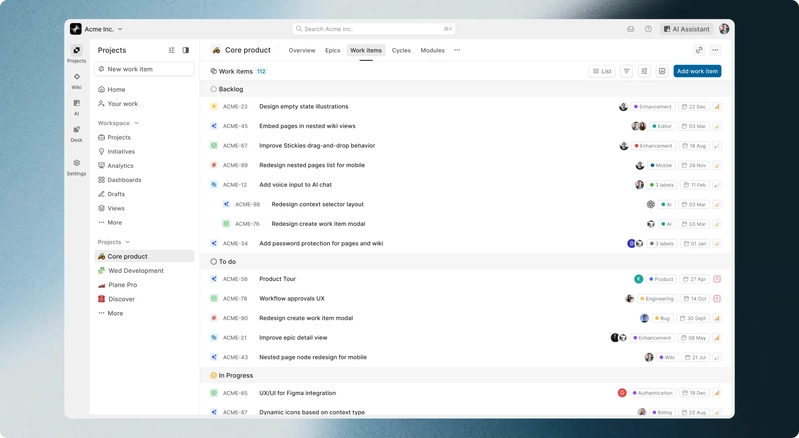
So I hunted down alternatives by searching through open source project management tools. I came across Plane.
The features on Plane map cleanly onto the volunteer platform’s needs:
-
Calendar view gives a live monthly overview with nested tasks per event
-
Kanban with custom states handles the Not-started/In-progress/Done workflow.
-
Webhooks bridge to Telegram (via Make/Zapier) for instant claim and “stuck” alerts, while rich-text descriptions hold venue details, guides, and linked Drive folders.
-
Custom properties and issue templates let organizers tag and auto-populate different event formats (2h talk, month-long campaign, large-scale).
However, my Director pointed out that migrating to another platform or getting our volunteers to download an app might create resistance. We once tried to encourage our volunteers to use Notion, but it wasn’t intuitive.
We also spoke about using GitHub Projects, but we realised not all of our volunteers are in technical roles and they might not be familiar with version control. Our single source of truth was Google Drive. It has all of the event folders with the Introduction slides, the attendance sheet, and feedback form.
So I decided to create a Google Sheet and wrote the headings as “Event ID, Event Name, Format Type, Date, Time, Venue, Google Drive Folder Link, and one liner about the event.”

With that, I used the Google Apps Script and vibecoded a script Code.gs, and Index.HTML.
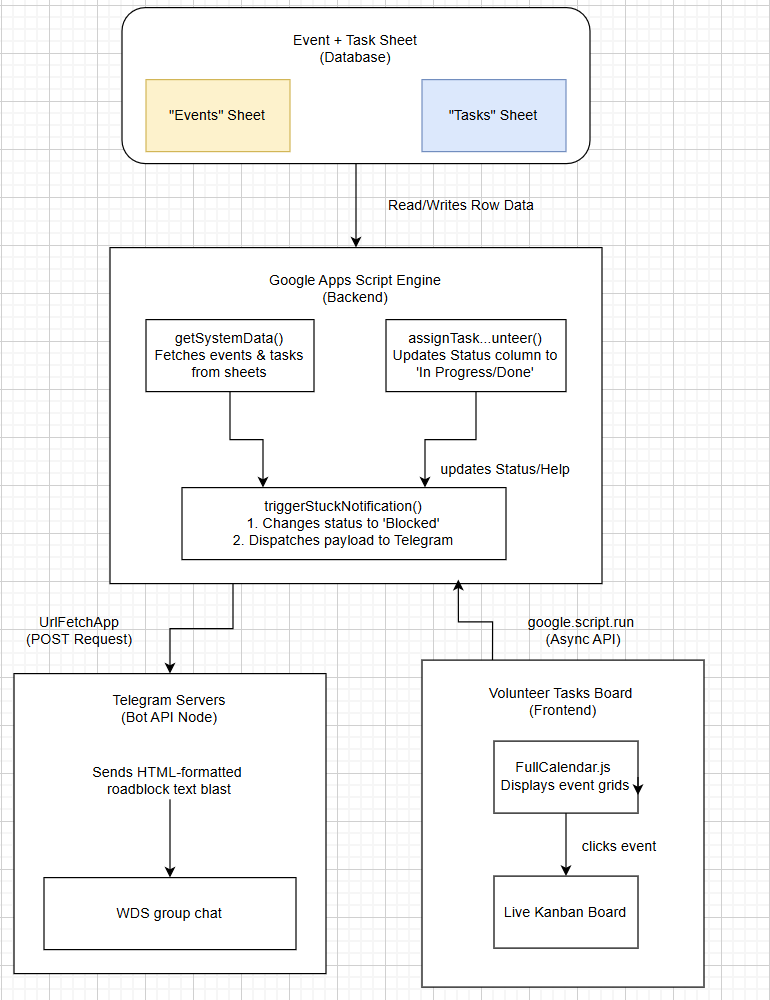
Here’s what the system architecture looks like:
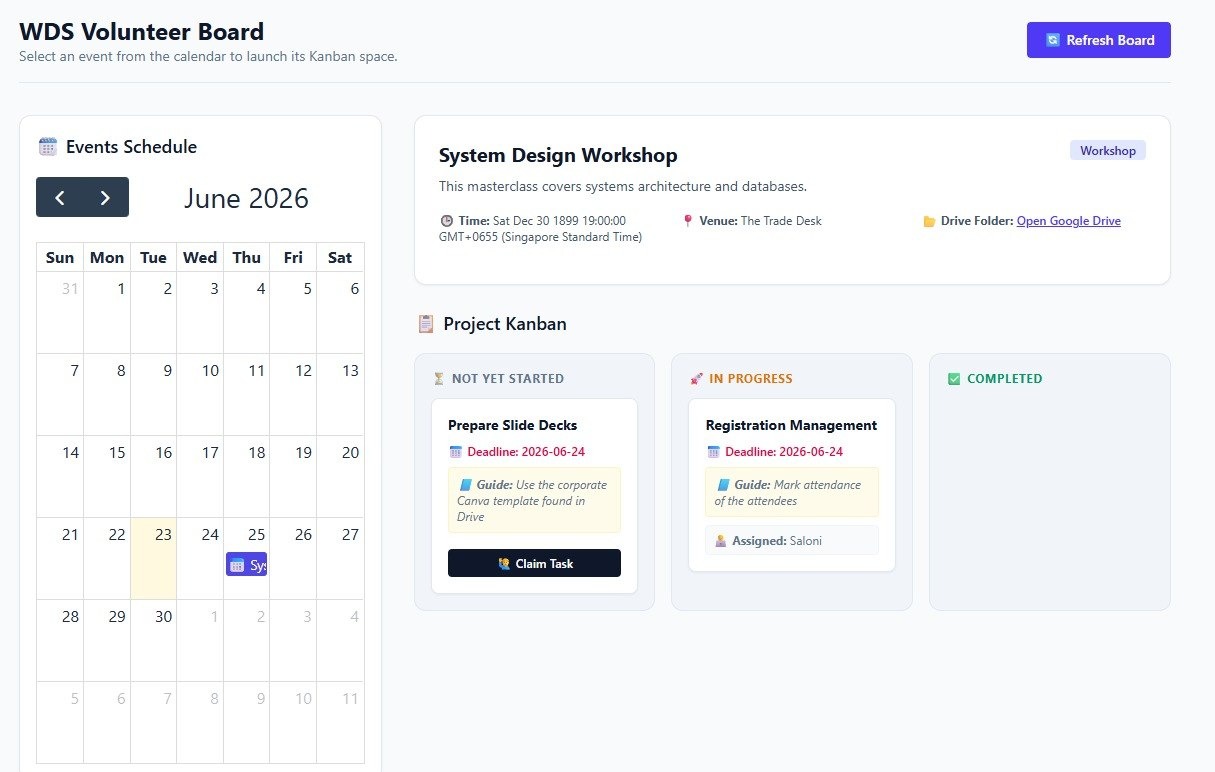
This was the initial prototype/version:
The browser uses FullCalendar.js to pin events onto the date tiles and Tailwind CSS to render the interactive Kanban columns (Not yet started, In Progress, Completed).
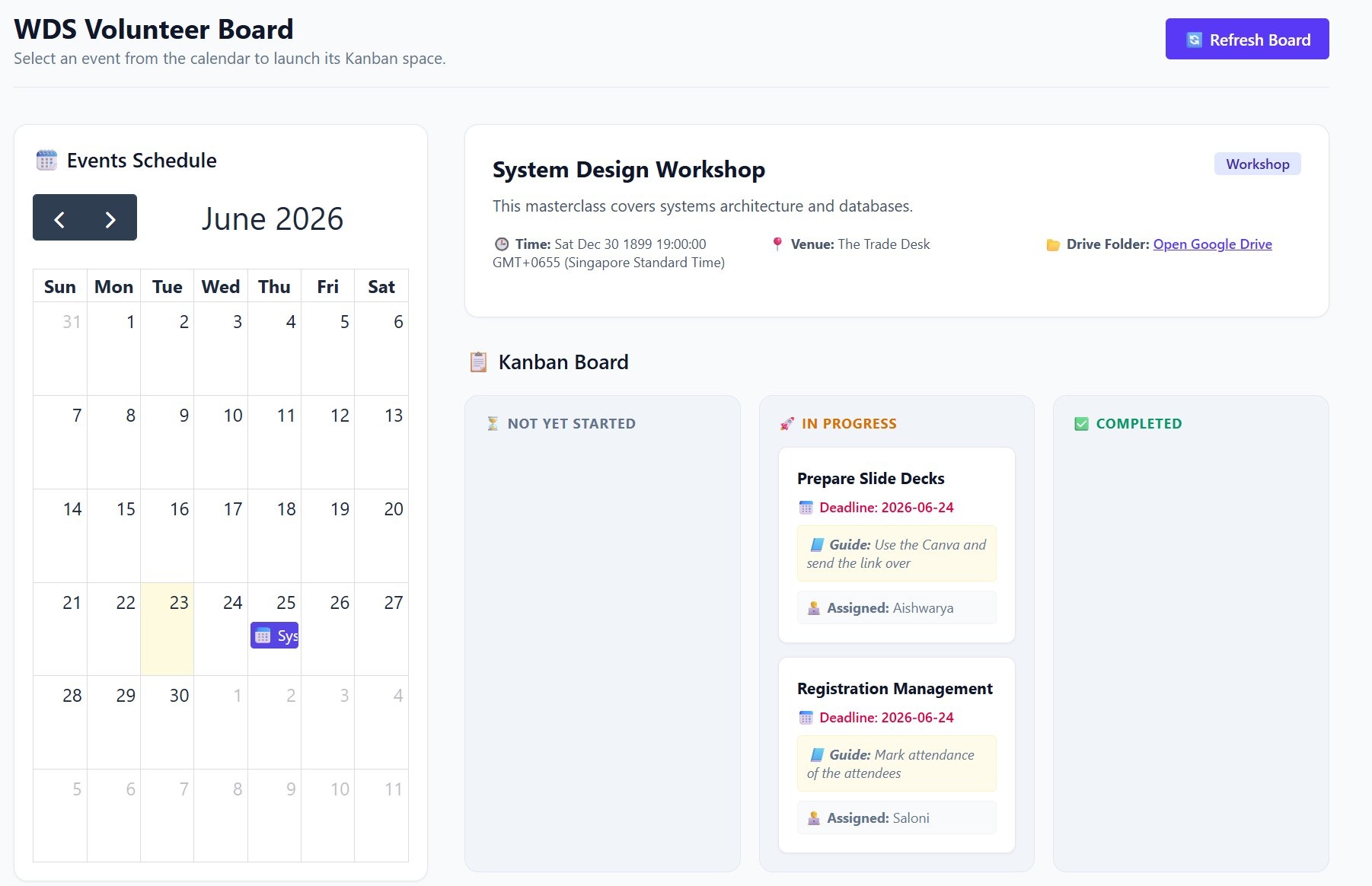
When a volunteer clicks Claim Task, a prompt captures their name. The portal calls assignTaskToVolunteer(), editing Column D (Status) and Column E (Volunteer Name) directly inside your Google Sheet in real time.
Result?
It didn’t work out. We didn’t want everyone to have access to the database and the code repo. We wanted to make sure that if anyone were to make changes, it had to be reviewed. Unfortunately, Google Apps Script didn’t have that function.
Also, all of our existing products currently live in our GitHub repositories.
So my Director proposed creating a web app & use the Gsheet as a database, with the current mockup as the inspiration. Basically, take the codebase out of App Script.
So my task:
-
Create a repository and issues for it on GitHub
-
Implement Features: When it creates a Google Drive, it copies the WDS intro slides + Feedback form via Google Form + QR Code Generator
Resources
https://dev.to/nocobase/open-source-project-management-tool-selection-guide-2026-edition-4go5
🔧 Enjoyed the read?
That’s the problem and the pivot. Next up in the series, I’ll walk through Step 1: setting up Google Service Account credentials, the first piece of actually building this out.
If this gave you a new way to think through a build decision, follow along. I write about full-stack builds, system design, and geospatial engineering, from career platforms to volunteer task boards, as I ship them.
Let’s connect:
~ Aishwarya